Quill
A studio that turns a one-line idea into a finished picture book.
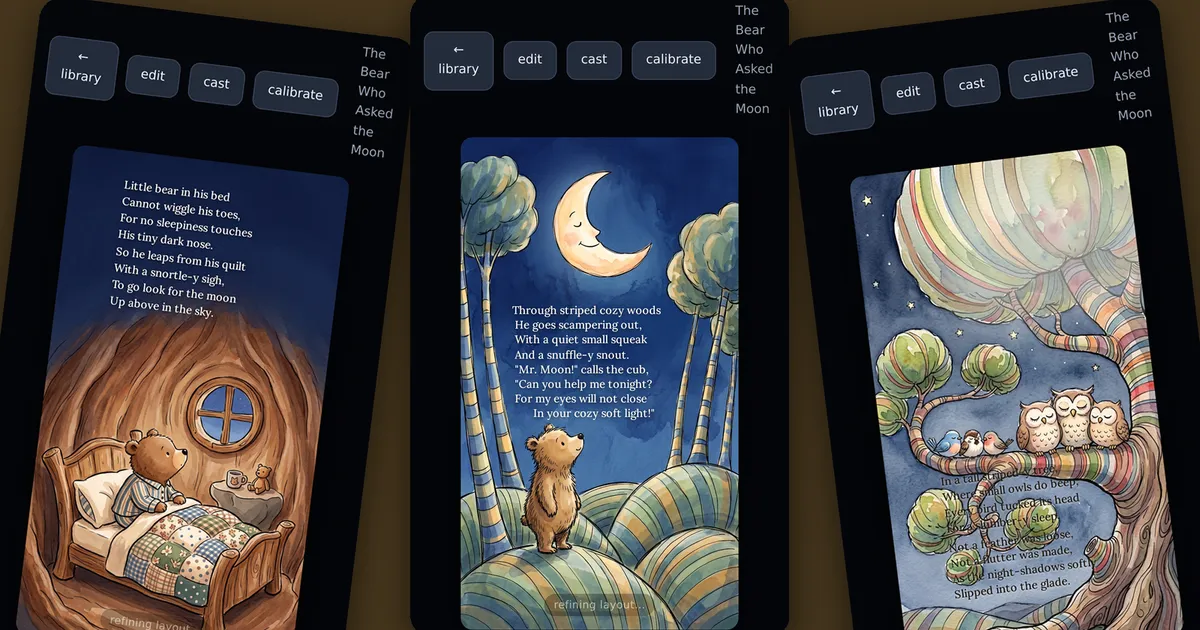
Quill is a picture-book studio I built for my own kids. You give it a premise - a character, a mood, a lesson, whatever - and it produces a complete, illustrated book: a written story broken into pages, original art for each spread in a single coherent style, and text placed onto the illustrations so the finished thing reads like a real book rather than a slideshow.
How it works
The generation runs as a pipeline, not a single prompt:
- Story first. A language model drafts the narrative and splits it into page-sized beats, with an art brief for each page describing what should be illustrated.
- Art with continuity. Each page is illustrated from its brief, with the style and recurring characters held consistent across the whole book rather than drifting page to page - the hard part of AI illustration.
- Text placement. A layout engine positions the words on each illustration, choosing regions that don’t fight the art and keeping type legible against a busy background. This is the piece I’ve iterated on most.
- A reader built for the couch. Books render in 9:16 portrait so they read naturally held upright on a phone, which is how they actually get used at bedtime.
Using it
- Making a book is a short guided flow, one choice per screen: describe the idea, then pick the illustration style, the author’s voice (each shown with a couple of sample lines so you can choose it by ear), and the art direction (with a small preview of how it stages a page), then a reading length. Length is set in minutes (“bedtime standard” is the default), not page count, because minutes is how you actually decide at bedtime.
- The words come first, and free. It drafts the whole story and shows you every page’s text, the title, and an estimated read-aloud time before anything is drawn - with a plain “nothing has been drawn yet.” Illustrating is a separate button that shows the dollar cost, so you never pay for art on a story you didn’t want.
- Reading is full-screen 9:16 with tap zones (left half back, right half forward) and a soft crossfade between pages. It’s built to be held upright in one hand in a dark room, not clicked through like a slideshow.
- Text sits directly on the art. When the auto-placement fights the picture you can drag the block, nudge individual lines, or recolor the ink per page - and hand edits are kept, never silently recomputed.
- A book stays a draft until you publish it, so the library only holds the ones you’re happy with. Published books live on named shelves you arrange like rows on a streaming home screen, with a search view for finding one by title. Drafts and anything you archive stay out of the way but recoverable.
Building your own voices and styles
The author voices, illustration styles and page-composition directors are editable, and you build them from source material rather than by writing prompts. Point a persona at a few books, authors, or reference images you like - searched and composed right in the app - add an optional note, and it distils a reusable voice or look. What it produces is described from first principles (an original style, never a named artist), consistent with keeping the whole thing personal-use and keeping other people’s names out of what gets generated.
Notes
It’s a single-user app - a Go backend with an embedded React front end and SQLite, running on my homelab’s Kubernetes cluster and locked to just me. The front end installs to a phone’s home screen like a native app, and a read book stays readable offline. It isn’t a product and isn’t for sale; it exists so I can make my kids a specific book on a specific evening.
snapshot
reflects quill@946bbafcaptured Aug 18, 2026